Kids Offline Preschool Games
- 4.2
- Rating
- 1.00M
- Installs
- Free
- Price
 Analysis by App-foxy
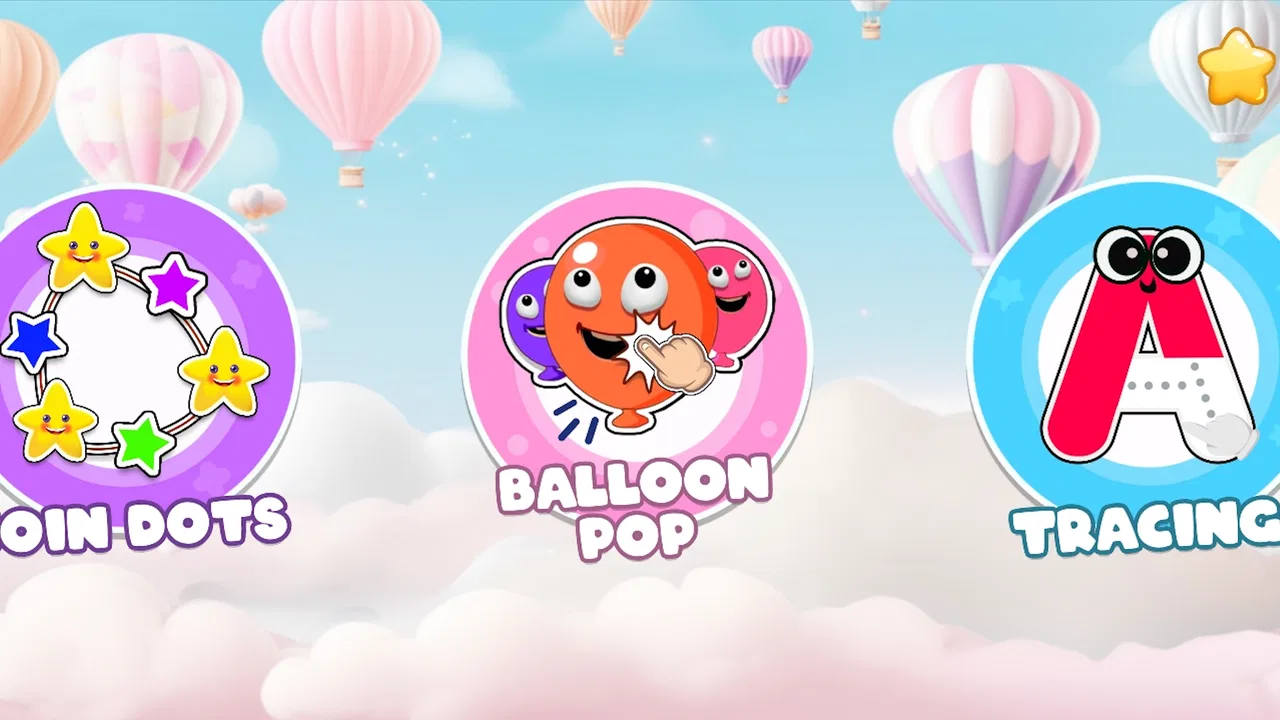
I approached Kids Offline Preschool Games as a practical question rather than a promise: can one children’s game give a preschooler something useful to do without turning a short quiet moment into a complicated setup? My answer is mostly yes. This is a free educational game from Kidzooly - Kids Games, Rhymes , Nursery Songs that brings together preschool activities such as tracing, coloring, and other simple play. I found its biggest strength in that variety. A child can move from a basic learning task to a creative one without needing a different app each time.
That convenience matters in ordinary family life. Imagine waiting at a café, sitting in a car before an appointment, or needing ten calm minutes while preparing dinner. The app is designed for that kind of small window. It is not a replacement for a parent, teacher, workbook, or carefully planned early-learning program, but it can be a friendly digital activity when a child needs something familiar and easy to start.
At the same time, I would not describe it as a complete preschool curriculum. Its activities are best understood as short practice sessions and entertainment with an educational purpose. Children who enjoy repetition and colorful interaction are likely to get the most from it. Older children, advanced learners, or families looking for detailed progress tracking may find the experience too basic.
You May Also Like

 Blood Strike: 2.5 Anniversary
Blood Strike’s Loadouts Turn Every Drop Into a Tactical Gamble
A close look at Blood Strike’s custom loadouts: how fast access to signature weapons reshapes its battle royale rhythm, rewards preparation, and narrows the gap between fights.

 Pandora - Music & Podcasts
Pandora’s Music Is Easy to Start, but Harder to Recover
Pandora’s strength is its low-effort path from a seed to a station. Its weak spot is how much confidence it asks you to place in connection, setup, and quiet recovery.

 8 Ball Pool
 Is Built on Rivalries, Rematches, and Routine
A close look at the rivalries, rematches, shared routines, and unanswered safety questions that turn a quick pool match into a persistent mobile community.

 Samsung Music
’s Quiet Strength Is Playing What You Already Own
Its reach comes less from spectacle than from dependable access to a personal library. That simplicity is both the app’s strongest retention engine and its ceiling.

 AccuWeather: Weather Radar
AccuWeather Review: A Quick, Clear Forecast for Everyday Decisions
For everyday plans, the best forecast is the one you can understand quickly. AccuWeather makes rain timing, radar, and local conditions easy to act on, with a few trade-offs.

 Hill Climb Racing
Why Hill Climb Racing Still Turns Crashes Into One More Run
A tiny car, a bumpy hill and one more upgrade: Hill Climb Racing keeps resurfacing because its simple chaos makes every near-miss feel personal.
More From Our News Desk



What makes the game useful for preschool practice
The central appeal is the mix of activities. Tracing can support early control of finger movement, while coloring gives children a less rigid way to interact with shapes and visual choices. Other small games add variety, which helps prevent the app from feeling like a single worksheet repeated on a screen. For a young child, changing the type of task can be enough to restore attention after a few minutes.
I especially like the way this combination can fit different moods. A child who is ready to concentrate may prefer tracing. A child who is tired or frustrated may respond better to coloring. That makes the app more flexible than a narrowly focused alphabet or number title. Parents do not have to decide in advance whether the child needs handwriting practice or free-form creative play; they can let the child move between the available areas.
The offline focus is another meaningful advantage. When an activity works without a live connection, it is more dependable for travel, waiting rooms, and places with weak reception. It also makes the game easier to use as a prepared distraction: I can think of it as something to open after downloading it, rather than something that requires a last-minute search for a network. For families trying to limit streaming or online browsing, that distinction is useful.
Offline access does not automatically make every screen ideal for every child, of course. A parent still needs to decide how long the session should last and whether the child is using the activities actively or simply tapping through them. The strongest learning value comes when an adult occasionally names what the child is doing, asks the child to describe a color or shape, or connects the on-screen task with paper, crayons, and real objects.
That is one of my practical tips: use the game as a starting point for a short conversation, not as a digital babysitter with no follow-up. After tracing, a child could try drawing the same kind of line on paper. After coloring, the child could look around the room for objects with similar colors. This small bridge from screen to real life gives the app more value than simply leaving it running.
A gentle entry point for young learners
The game is aimed at preschoolers, and the Everyone content rating makes it suitable for a broad family audience. In practice, suitability still depends on the child’s age, confidence, and ability to use a touchscreen. A child who is just learning to drag a finger may need an adult nearby, while a more experienced preschooler may explore more independently.
I would introduce it in a short guided session. Rather than handing over the device and expecting the child to understand every option, I would open one activity, demonstrate the gesture, and then let the child try. This approach reduces the chance that the child becomes lost in menus or starts tapping randomly. Once the basic interaction is familiar, independent play becomes more realistic.
The game can also work well for siblings at different preschool levels, but not in exactly the same way. One child may use tracing to practice control, while another treats the same area as a quick drawing challenge. Parents should resist comparing the results. The app is more useful when each child has a small personal goal, such as following a path carefully or choosing colors deliberately.
One non-obvious trade-off is that variety can be both a strength and a distraction. Switching between several activity types keeps the experience fresh, but it may also encourage a child to abandon a difficult task as soon as it becomes challenging. I found it better to offer a simple choice with a limit: finish one tracing attempt, then choose coloring. That keeps the child’s sense of control without turning every moment of difficulty into an automatic escape.
How it compares with common preschool alternatives
Compared with a traditional workbook, the game is easier to carry and more immediately interactive. A child receives visual feedback from touching the screen, and there is no need for pencils, erasers, or a table. That makes it convenient during travel. The workbook is still better for building physical pencil control, encouraging slower work, and creating something that can be kept or shown to someone else.
Compared with a single-purpose tracing app, this title offers a broader range of activities, which may help a child who loses interest quickly. The trade-off is focus. A dedicated tracing tool may be preferable when a parent wants a concentrated handwriting session rather than a selection of preschool diversions. I would choose this game for variety and a specialist app for a very specific practice goal.
Compared with video content, the game asks the child to participate rather than watch. That is a meaningful difference, especially when the child needs a small hands-on activity. However, interactive does not always mean educationally deeper. A video can model songs, stories, or language in ways a simple game cannot. Families looking for rich listening, pronunciation practice, or extended storytelling should use other resources alongside this one.
Compared with a structured learning platform, the advantage here is simplicity. There is less pressure to follow a lesson sequence, and the child can move toward a preferred activity quickly. The disadvantage is that parents who want detailed milestones, organized courses, or a clear long-term progression may prefer a more formal educational product. I see this game as a useful activity box, not as a full teaching system.
The limitations parents should understand
The main weakness is depth. Preschool games can be enjoyable and still provide only a small amount of practice at a time. A child may complete an activity without understanding why the skill matters, and repeated tapping can look like learning from a distance. This is where adult involvement makes a noticeable difference. Even a brief comment or question can turn passive play into a more thoughtful exercise.
Another limitation is that touchscreen tracing is not the same as handwriting. A finger sliding across glass does not develop exactly the same grip, pressure, or wrist movement as holding a crayon. I would not use the game as the only preparation for writing. It works better as a warm-up before paper practice, particularly when a child is reluctant to begin with a pencil.
Parents should also pay attention to the in-app purchase structure. The game is free to start, with in-app purchases priced at $3.49 per item. That does not make it unsuitable, but it means I would check the available options before allowing a child to explore alone. A young child may not understand the difference between a free activity and a purchase prompt, so an adult should handle any decision involving paid content.
This is also why I would avoid presenting the game as completely frictionless. Free access is helpful, but families need to remain aware of what the child can reach and how the device is configured. The safest routine is simple: an adult chooses the activity, keeps control of purchasing, and ends the session rather than waiting for the child to decide when to stop.
There is a further practical issue with attention span. A collection of short activities may keep a child busy, but it can also create a habit of expecting constant novelty. If your goal is patience, sustained drawing, or careful completion, set a small challenge before opening the game. For example, ask the child to finish one selected task slowly, then allow a change of activity. This turns the app’s variety into a reward instead of letting it dictate the entire session.
Everyday situations where it fits best
For travel, I would prepare it before leaving and test the activities while still at home. That avoids discovering in the back seat that the child needs help with the controls. A short session can fill an awkward pause without requiring sound, streaming, or a pile of supplies. I would still bring a book or coloring materials for balance, because a device is most useful when it is one option among several.
At home, it can work as a transition activity. A child might use tracing for a few minutes before moving to paper, or color digitally while waiting for a parent to finish a task. The key is to give the session a clear beginning and end. Without that boundary, the app’s convenience can make it tempting to extend screen time simply because the child is occupied.
It may also help when a child needs a low-pressure way to revisit basic skills. If paper tracing produces resistance, a touchscreen activity can feel less intimidating. Once the child is willing to follow lines digitally, I would move toward physical materials and praise effort rather than accuracy. The app should open the door to practice, not become the final destination.
For classroom or group use, I would be more cautious. A single device can be useful for a teacher demonstration or a quiet individual station, but the experience is likely more personal than collaborative. Children may progress at different speeds, and sharing a screen can turn a calm activity into a disagreement. It is better suited to individual use with clear turn-taking than to a large group expecting one synchronized lesson.
Device fit, cost, and long-term usefulness
The game runs on Android devices with a minimum operating system of 8.0. Families using older phones or tablets should check compatibility before planning around it. On a suitable device, the simple preschool focus should make it approachable, but the quality of the experience will still depend on screen size, touch responsiveness, and whether the child can hold the device comfortably.
Its current version is 1.65, and the product has been available since Apr 12, 2018. That gives it a longer presence than a brand-new children’s title, while the current version indicates that the app has continued as an identifiable product. I would still judge it by the child’s actual response rather than by age alone: a long-running app can be familiar and useful, but it may not feel as polished or ambitious as newer educational platforms.
The public response is encouraging without making the game an automatic choice. It has a 4.2 average from around 4.1 thousand ratings, and it has passed over 1 million installs. I read that as evidence that many families find the format worthwhile, not as proof that every child will enjoy it. Preschool preferences vary sharply; one child may happily repeat tracing while another wants stories, music, or physical play.
The developer, Kidzooly - Kids Games, Rhymes , Nursery Songs, positions the title within a wider children’s entertainment and learning style. That context helps explain the mix of activities: it feels designed for short, approachable moments rather than a demanding academic program. If you already like simple nursery-oriented apps from the same developer, the tone may feel familiar. If you want a highly structured school-readiness tool, you may need something more specialized.
The price is free, which makes it easy to try without committing money at the outset. The paid items deserve attention, but the basic cost is still a clear advantage for families comparing it with subscription-based learning services. I would recommend trying it during a supervised session before deciding whether any extra purchase is worthwhile. A child’s reaction after five minutes will tell you more than the feature list.
Who should choose it, and who should skip it
I would recommend it to parents of preschoolers who want a compact collection of tracing, coloring, and other simple activities in one place. It is particularly suitable for families that value offline use, need something for travel or waiting periods, and are comfortable adding adult guidance. It can also suit children who become bored with single-purpose learning apps and benefit from switching between structured and creative tasks.
It is a reasonable first try for a child who is beginning to explore educational games. The free entry point lowers the risk, and the Everyone rating makes it easier to consider for a family device. I would introduce it gradually, observe which activities hold attention, and use those observations to decide whether the app deserves a regular place in the child’s routine.
I would skip it if you need formal assessment, detailed progress reports, or a carefully sequenced preschool course. I would also look elsewhere if your child mainly wants rich stories, music-led language learning, multiplayer play, or advanced creative tools. The game’s value is in accessible variety, not in depth across one academic subject.
It is not the best choice for families trying to replace hands-on learning with screen time. Even its strongest activities should sit beside crayons, books, conversation, movement, and real-world exploration. A child who spends every session jumping between options may be entertained without building much persistence, so the parent’s routine matters almost as much as the app itself.
My final recommendation
After weighing the convenience against the limitations, I see Kids Offline Preschool Games as a useful activity companion rather than a complete preschool solution. Its mix of tracing, coloring, and child-friendly games gives it more flexibility than a narrow practice app, while offline access makes it genuinely practical beyond the home. The free starting price also makes experimenting easy.
My recommendation is strongest for supervised short sessions. Choose one activity, let the child explore, connect it to something away from the screen, and stop before the experience becomes automatic background tapping. That workflow brings out the app’s educational value and reduces its biggest weakness: the temptation to confuse interaction with progress.
For parents seeking a simple, portable way to add variety to a preschooler’s day, it is worth trying. For parents seeking a full curriculum or measurable skill development, I would pair it with more structured tools and physical practice. In the right role, this game is approachable, convenient, and pleasantly flexible; in the wrong role, it is too light to carry the whole burden of early learning.
Overall, I would keep it available for travel, waiting rooms, and short practice breaks, while making sure it never becomes the only activity on offer. That balanced use is where I think it works best: a gentle digital supplement that supports preschool play without pretending to replace real-world learning.
FAQs for Kids Offline Preschool Games
01What is Kids Offline Preschool Games?
Kids Offline Preschool Games is an educational app designed for young children, generally focused on preschool skills such as colors, shapes, numbers, letters, matching, memory, and simple problem-solving. Its activities are presented in a playful format with bright visuals and easy controls, allowing children to explore basic concepts independently while parents supervise their progress and screen time.
02Can children play Kids Offline Preschool Games without an internet connection?
Yes, the app is intended to support offline play, which is especially useful for travel, waiting rooms, or situations where Wi-Fi and mobile data are unavailable. After installation and any required initial setup or content download, many of the included activities can usually be played offline. Parents should still check the app’s current store description for exceptions, updates, or optional online features.
03What age group is Kids Offline Preschool Games suitable for?
The game is mainly aimed at preschool-aged children, commonly around two to six years old, although the ideal age depends on each child’s development and familiarity with touch-screen controls. Younger children may need help understanding the instructions, while older preschoolers may enjoy completing activities independently. Adult guidance is recommended when introducing the app for the first time.
04Is Kids Offline Preschool Games safe and appropriate for children?
The app is designed with child-friendly activities and simple interactions rather than complex gameplay, making it approachable for early learners. However, parents should review the app’s permissions, advertising policy, in-app purchase settings, and privacy information before allowing independent use. It is also wise to activate parental controls and supervise play, since educational apps should complement—not replace—real-world learning and interaction.
05Does Kids Offline Preschool Games include ads or in-app purchases?
The availability of advertisements, paid upgrades, or additional content can vary depending on the version, operating system, and developer settings. Before downloading, parents should carefully inspect the Google Play or App Store listing for information about ads, purchases, and family-friendly policies. If the app offers optional extras, enabling purchase restrictions on the device is recommended to prevent accidental transactions.
Pros
- Works without internet
- making it useful for travel and offline play.
- Simple controls are easy for young children to understand independently.
- Covers several preschool skills in one convenient app.
- Bright visuals and playful sounds help maintain children’s attention.
- Short activities suit young children’s limited focus and free-time sessions.
Cons
- Some activities may feel too easy for older preschoolers.
- Repeated sounds and animations can become tiring over time.
- Parents may need to guide children through unfamiliar activities.
- The app may take noticeable storage space on smaller devices.
- Limited challenge variety can reduce replay value after frequent use.

Kids Offline Preschool Games
Gallery